


[插件] 免费破解版扒谱神器 zplane.deCoda.v1.0.2.CE-V.R

[复制链接]

[插件] 免费破解版扒谱神器 zplane.deCoda.v1.0.2.CE-V.R[复制链接]

Winston 发表于 2024-8-10 13:58:28 [显示全部楼层] |只看大图 回帖奖励 |倒序浏览 |阅读模式 回复:  9 浏览:  1061

zplanedeCoda(音乐解码学习软件)融合了诸多音频技术性,让歌曲的训练更为方便快捷,deCoda能对你说声调、节奏感、和弦、诗词和基调的部位,致力于协助初学者和高手作曲家学习培训和训练歌曲精彩片段>手机软件详细介绍】deCoda能够

zplane deCoda(音乐解码学习软件) V1.2.2官方版软件特性

zplane deCoda(音乐解码学习软件)融合了诸多音频技术性,让歌曲的训练更为方便快捷,deCoda能对你说声调、节奏感、和弦、诗词和基调的部位,致力于协助初学者和高手作曲家学习培训和训练歌曲精彩片段!

ChMkLGRsgeuIe1CtAABB3B-jEYIAAQWDALoRlEAAEH0034.jpg

【手机软件详细介绍】

  deCoda能够编解码一切歌曲,因此 你能在十多分钟内学好弹奏。在几秒内,deCoda就能对你说声调、节奏感、和弦、诗词和基调的部位这些。

  应用deCoda如同加上你最爱的歌曲,让deCoda帮你搞清楚一样简易。deCoda的设计构思来自于歌曲和音频领域的从业人员,deCoda出示的作用让学习培训歌曲越来越更为轻轻松松。

  deCoda是由zplane打造出的。zplane的技术性被用以制做全世界很多顶尖明星和制片人的受欢迎歌曲,而一样的技术性也被用以deCoda。

【功能介绍】

  优秀的和弦和速率检验优化算法

  灵便的Loop选择项

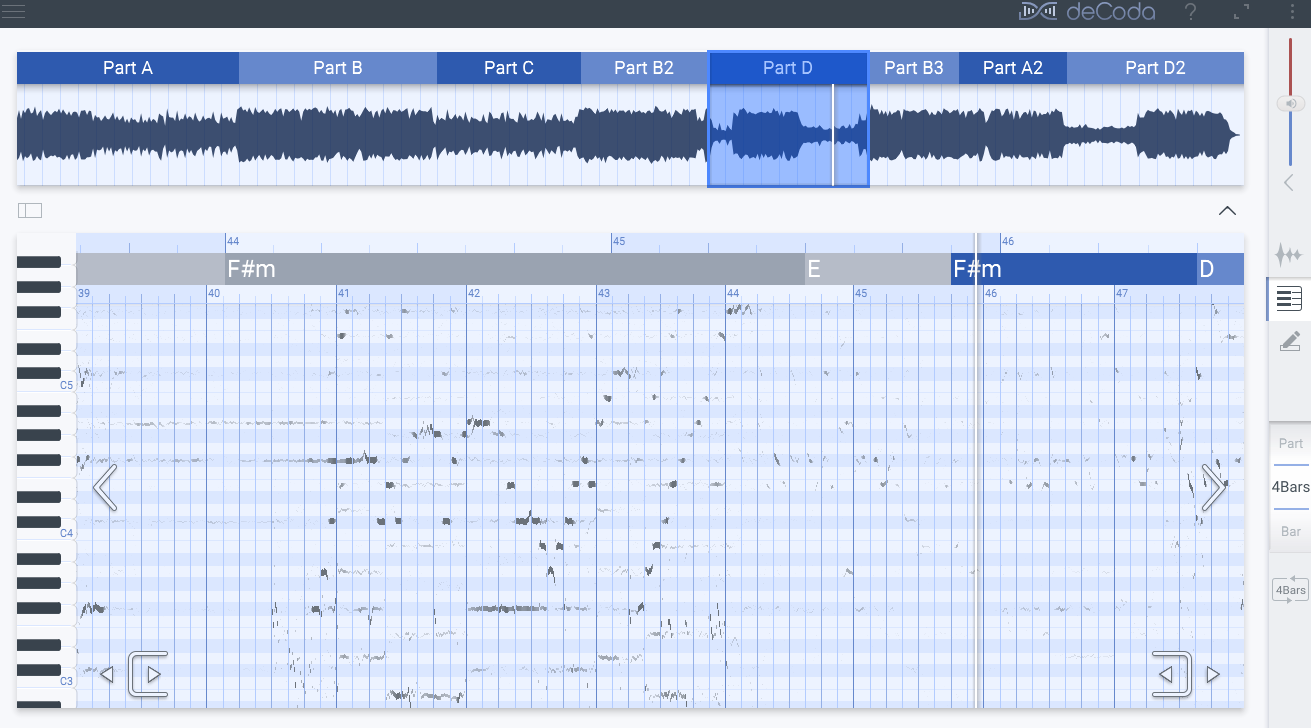
  全自动歌曲结构检验-A,B C,A2,B2一部分等区划

  适用Mac和Windows

  设计方案GUI时考虑到了触摸显示屏

  马上移调到选中的钢琴键

  维持音高的前提条件下更改节奏感

  Focus EQ用以防护音频的每个频率段

  电子琴卷下显示信息节奏信息

  可导出来MIDI

【配备规定】

  电脑操作系统:Mac OS 10.7之上,Windows 7之上(x86 / x64位)

  音频驱动器:CoreAudio,Windows Audio,DirectX,ASIO

  视頻:最少1366x768屏幕分辨率

  CPU:最少1.5Ghz

  适用的音频文件格式:wav,aiff,mp3,wma,flac,ogg

【操作方法】

  简易地拖拽音频文档进到手机软件,deCoda将自动检索和投射和弦,歌曲结构和速率。随后,客户能够调节播放视频速率,从慢速度刚开始,伴随着英雄熟练度提升 逐渐提高速度。歌曲能够及时移调,音高可往上或向下沉一个八度。deCoda还出示Focus EQ作用,能够依据頻率和声像信息屏蔽掉一部分传统乐器信息,获取想学习培训的传统乐器节奏线。

回复

使用道具 举报

Winston
 楼主|
发表于 2024-8-10 13:59:03 显示全部楼层
  zplane deCoda是一款专业的音乐学习的工具软件。支持帮助小白和老手音乐家学习和练习音乐片段。十分方便快捷,界面简约,布局直观清晰,操作简单,极易上手,是一款不可多得的利器。华军软件园为您提供zplane deCoda电脑版下载,快来体验吧!
154631-63c7a3d7a8579.jpg
zplane deCoda软件介绍
      简单地拖放音频文件进入软件,deCoda将自动识别和映射和弦,歌曲结构和速度。然后,用户可以调整播放速度,从慢速开始,随着熟练度提高逐步加快速度。音乐可以即时移调,音高可向上或向下移一个八度。deCoda还提供Focus EQ功能,可以根据频率和声像信息屏蔽部分乐器信息,提取想学习的乐器旋律线。
zplane deCoda软件特色
      先进的和弦和速度检测算法
      灵活的Loop选项
      自动歌曲结构检测-A,B C,A2,B2部分等划分
      zplane deCoda最新版支持Mac和Windows
      设计GUI时考虑了触摸屏
      立即移调到选定的琴键
      保持音高的前提下改变节奏
      Focus EQ用于隔离音频的各个频段
      钢琴卷上显示旋律信息
      可导出MIDI

回复

使用道具 举报

Winston
 楼主|
发表于 2024-8-10 14:00:28 显示全部楼层
回复

使用道具 举报

Winston
 楼主|
发表于 2024-8-10 14:02:28 显示全部楼层
zplane.deCoda.v1.0.2.CE-V.R.rar (47.11 MB, 下载次数: 155)
回复

使用道具 举报

Winston
 楼主|
发表于 2024-8-10 14:03:42 显示全部楼层
微信图片_20240808105501.png
回复

使用道具 举报

Winston
 楼主|
发表于 2024-8-10 14:05:26 显示全部楼层
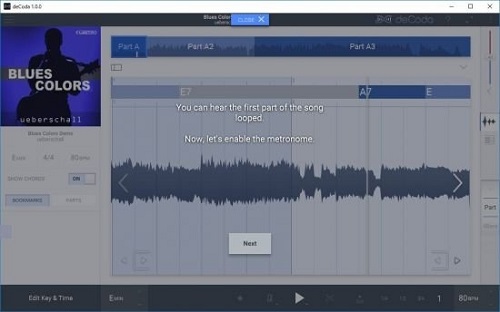
软件开启界面有学习的按键,一步一步跟着学,很容易掌握。
回复

使用道具 举报

Winston
 楼主|
发表于 2024-8-10 14:07:04 显示全部楼层
deCoda 可以解码任何歌曲,因此您可以在几分钟内学会播放它。在几秒钟内,deCoda 会告诉你主旋律、节奏、和弦和合唱的位置等等。

使用 deCoda 就像添加您最喜欢的歌曲并让 deCoda 帮助您解决问题一样简单。受到音乐和唱片行业工作人员的启发和启发,deCoda 提供的功能使学习歌曲比以往任何时候都更加轻松。
deCoda 由 zplane 构建。 zplane 技术被顶级艺术家和制作人用于制作世界上许多最热门的作品,同样的技术也被用于为 deCoda 提供动力。

音乐导航
deCoda 对歌曲节拍、速度和结构的了解让您能够以音乐术语而不是样本或秒来导航。只需敲击键盘或轻扫触摸屏,即可按部分、小节或节拍探索歌曲。自动有一个部分循环并以同样快的速度扩展这些循环。专注于您的仪器,而不是导航。

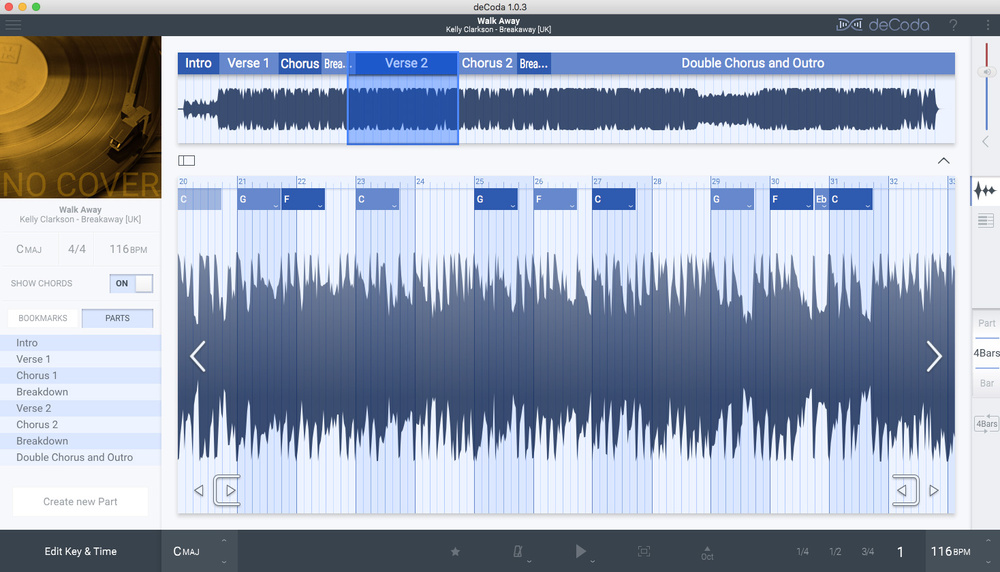
和弦和结构识别
deCoda 解码您歌曲的音乐数据,例如节拍、速度、键、和弦和歌曲结构。使用 AI deCoda 可以对每个问题进行有根据的猜测,为您的编辑提供一个良好的起点。在某些情况下,您不需要进行任何编辑!

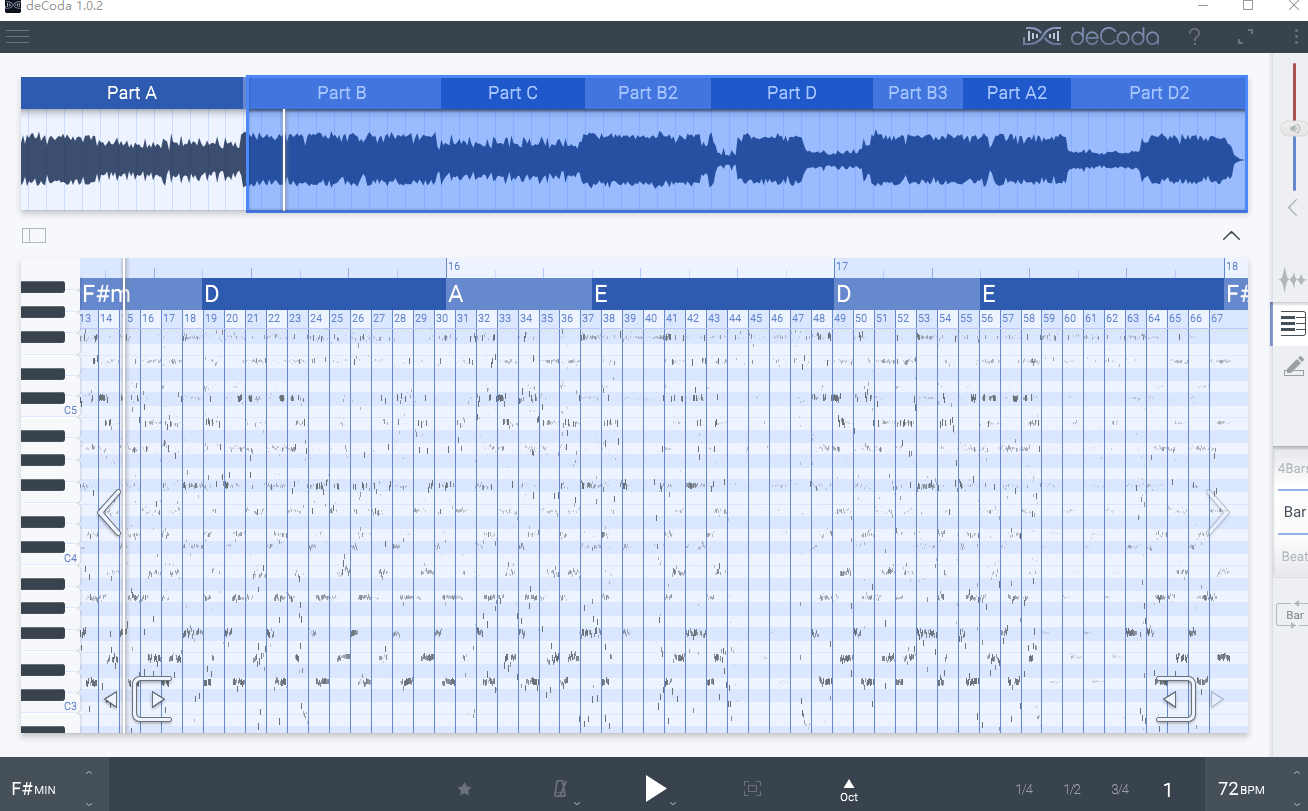
带光谱视图的钢琴卷
钢琴卷曲显示歌曲的旋律内容,并让您选择可用于转录的音符。结果可以回放并作为 MIDI 导出到您的 DAW 或乐谱软件。

重点
聚焦模式可让您突出显示您想听到的立体声混音中的乐器。当你完成了部分的计算后,然后切换到倒置焦点模式以移除乐器并使用背景音轨进行练习。

改变节奏,音高或两者兼而有之!
zplane 的 elastique Pro 是世界上最好和最常用的时间拉伸算法之一。当然,它也在 deCoda 内部。您可以放慢速度或加快速度并更改键以使其适合您的乐器或声音。 deCoda 还会检测歌曲的调音频率,并自动将其与您喜欢的调音频率相匹配 – 无需手动设置。

节拍器
需要节拍器来练习吗?如果您想要 deCoda 可以添加节拍器,点击第 4、第 8 或第 16 节拍 – 始终与您的歌曲同步。它还可以添加 1 或 2 小节的预备拍,甚至可以识别潜在的乐观,这样您就不会再错过第一个音符。


deCoda can decode any song so you can learn to play it in minutes. In seconds deCoda will tell you the key, tempo, chords where the verses and choruses are and more.

Using deCoda is as simple as adding your favourite song and letting deCoda help you figure it out. Inspired and informed by those working in the music and recording industry, deCoda offers features that make learning a song more effortless than ever.
deCoda has been built by zplane. zplane technology is used to make many of the biggest hits in the world by top artist and producers, and that same know-how is used to power deCoda.

Musical Navigation
deCoda’s knowledge of a song’s beat, tempo and structure let you navigate in musical terms rather than in samples or seconds. Explore the song in parts, bars or beats just with a keyboard hit or touch screen swipe. Automatically have a section loop and expand these loops just as quickly. Concentrate on your instrument, not the navigation.

Chord & Structure Recognition
deCoda decodes your song’s musical data such as beat, tempo, key, chords and song structure. Using AI deCoda makes educated guesses for each providing a good starting point for your edits. In some cases, you’ll not need to make any edits!

Pianoroll with spectral view
The pianoroll shows the melodic content of your song and lets you pick the notes that you can use for transcription. Results can be played back and exported as MIDI to your DAW or notation software.

Focus
Focus mode lets you highlight the instrument in the stereo mix that you want to hear. And when you’re done figuring out the part then switch to inverted Focus mode to remove the instrument and practice with the backing track.

Change tempo, pitch or both!
zplane’s elastique Pro is one of the best and the most used time-stretching algorithms in the world. And of course, it’s also inside deCoda. You can slow things down or speed them up and change the key to make it fit your instrument or voice. deCoda also detects the tuning frequency of the song and matches it automatically to your preferred tuning frequency – no manual setup needed.

Metronome
Need a metronome for practice? If you want deCoda can add a metronome, clicking in 4th, 8th or 16th beats – always in sync with your song. It can also add a 1 or 2 bar count-in and even identify a potential upbeat, so you will never miss the first note again.

回复

使用道具 举报

Winston
 楼主|
发表于 2024-8-10 14:07:21 显示全部楼层
未标题-1.jpg
回复

使用道具 举报

Winston
 楼主|
发表于 2024-8-10 14:07:43 显示全部楼层
带光谱视图的钢琴卷
钢琴卷曲显示歌曲的旋律内容,并让您选择可用于转录的音符。结果可以回放并作为 MIDI 导出到您的 DAW 或乐谱软件。
回复

使用道具 举报

Winston
 楼主|
发表于 2024-8-11 04:14:14 显示全部楼层
微信图片_20240808105501.png

播放时会自动标出和弦进行
回复

使用道具 举报

您需要登录后才可以回帖 登录 | 立即注册

本版积分规则

52

主题

37

回帖

322

积分

积分
322
1
QQ